
Guide for shows
Artists' profile
Choose your name
For unverified artists, an identifier is appended to the end of their name (e.g., "#3"). To have the exact name of your choice, you must first get verified by contacting us at sfougara.gr@gmail.com
Choose a profile picture
Choose the one that suits you best; you can change it at any time
Enrich your profile with personal information
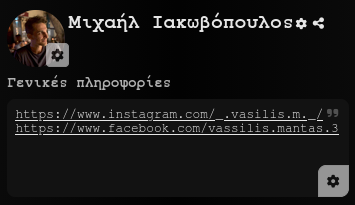
This is the information visitors will see when viewing your page, whether a show is currently live or not. This can include biography details, contact info, and social media links
Print your QR code
Your QR code remains the same for all your shows. By displaying it in a visible spot during your performance, your audience can easily learn how to participate and send you tips, without you having to say a word
Show's preparations
Add information about your upcoming show
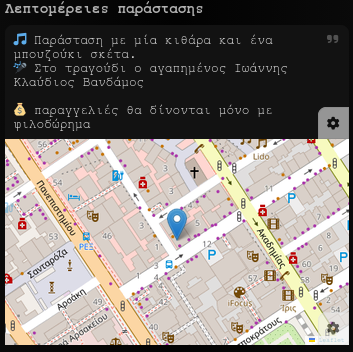
This details will only be visible while your show is live and can be updated at any point, even during the performance. This information can include the exact lineup of performers, an introductory message to your audience, the setlist/schedule, and more
Set the show location
Pin your show's location on the map. You can either set this manually in advance or set it during the show using your GPS location. Anyone searching for live shows near your location will be able to discover yours
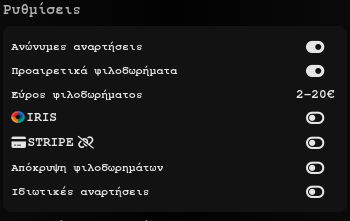
Show's settings
Anonymous posts
Determines whether users without an account are allowed to post content during your show
Optional tips
Determines whether every post must include a tip
Tip range
Sets the range of tip amounts available for users to choose from
IRIS
Enable the IRIS tip transfer method. Audience will use your phone number or TIN to transfer their tipes.
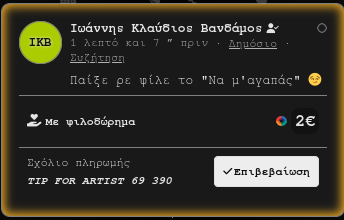
Tips transfered this way, requires from you to manually confirm the tip transfer. You can find more details about common tipping practices on this page
STRIPE
Tips transferred via Stripe are automatically confirmed. For this to work, your business account—or the account of your employer—must be connected to sfougara. Tips are transferred directly from the audience member into the connected account. You can find more details about common tipping practices on this page
Hide tips
Determines whether the tip amounts will be visible to the audience
Private posts
Determines whether a user can submit a post visible only to you and your show partners, but hidden from the rest of the audience (e.g., a secret tip)
Start/Stop show
Start show
When you are ready to begin your show (or shortly beforehand), click start. From that moment on, your show will appear as active, allowing the audience to find it, participate, post, send tips, and chat with each other
Stop show
The show stops when you choose to end it or if you remain off the show's page for more than 30 minutes. However, if the show has collaborators, the presence of any of them on the page will keep it active even if you are away
Show's collaborators
Select collaborators
During the show, you can select users from the audience to act as collaborator. These can be actual co-performers in your show or people who will assist you specifically with sfougara
Collaborators rights
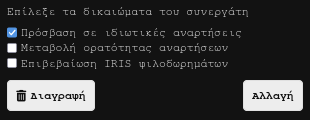
Set the permissions for each collaborator so they can view private posts, hide posts, or even confirm tips, allowing you to perform uninterrupted without managing the app. As long as one partner is active on the page, the show will stay live without requiring your own presence
Interaction with audience
Audience access and participation
Any user, whether anonymous or registered, can access and view your show
Audience posts
Anyone in the audience can post content to the show's feed, provided there are no specific restrictions in place. Such restrictions include enabling the block on anonymous users in the show settings or having blocked a specific account.

You or a collaborator can hide any post you feel shouldn't be public. For posts involving IRIS payments, the tip transfer must be confirmed manually
Audience chats
Chat conversations can only take place between registered users, provided they haven't blocked each other. In shows where tips are mandatory, no one can initiate a chat with the artist unless they have first made a confirmed post